Project Setup
Project setup covers the primary entry points into an Adamas VR development workflow. It explains how to begin work in Project Studio, how existing projects are recognized and opened, and how Adamas projects can also be developed as standard Node.js and TypeScript codebases using the Adamas API directly.
Project Studio Workflow
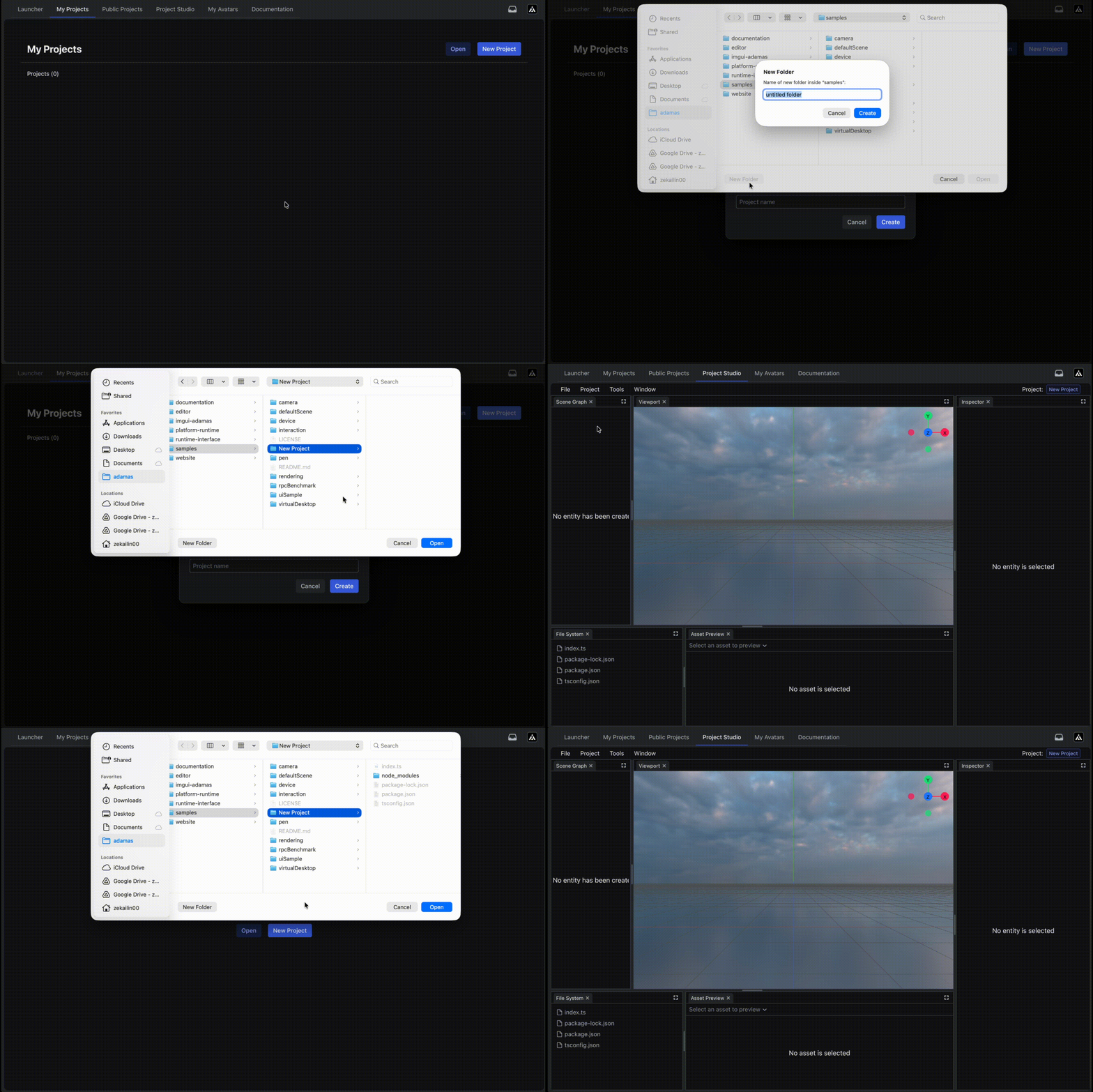
Starting work on a project in Adamas Hub.
Although Adamas VR projects are standard Node.js and TypeScript projects, it is strongly recommended to work on them through Project Studio in Adamas Hub. This provides access to the 3D scene editor, asset import workflows, and graphical component configuration tools in addition to TypeScript development.
Create a Project
To create a new Adamas VR project in Adamas Hub, open either the My Projects page or the Public Projects page and click New Project.
Select the Project Path field to open a directory picker. From there, choose or create the folder in which Adamas Hub should initialize the project. A default project name is provided automatically, but it can be changed before creation. Adamas Hub checks whether the selected folder already contains a .adamas directory to determine whether it is already configured as an Adamas project. If the directory does not exist, it is created during initialization.
When the project is created, Adamas Hub:
- generates project metadata in the
.adamasdirectory - creates a TypeScript project scaffold if one does not already exist
- installs the initial Adamas project dependencies, including
@adamasvr/sdk - navigates into the editor
Open a Project
Use Open to select an existing project directory.
Adamas Hub then attempts to load the project state from disk. If the selected folder does not contain a valid Adamas project, indicated by the expected .adamas project data, the editor remains closed and an error is shown.
Standalone TypeScript Workflow
Developers who are new to Adamas can skip this section and use Project Studio instead. This workflow is intended for advanced users who want to adapt an existing project for VR, integrate Adamas runtime capabilities into other tooling, or build software around the platform outside the Project Studio workflow.
In this approach, the Adamas TypeScript API package is installed into a standard Node.js and TypeScript project in the same way as any other npm dependency, and the remainder of the development process follows a conventional TypeScript workflow. When using this workflow, Project Studio features such as asset import and GUI-based scene-graph editing are not available. Only TypeScript coding is supported.
The following package.json example shows a minimal package configuration for this workflow:
{
	"name": "sample-project",
	"version": "1.0.0",
	"dependencies": {
		"@adamasvr/sdk": "*"
	},
	"devDependencies": {
		"@types/node": "^24.10.1",
		"typescript": "^5.8.3"
	}
}
For example, Adamas Hub itself is a standard TypeScript application that uses @adamasvr/sdk as one of its dependencies to implement editor functionality. In that sense, it is also a standard Node.js project that depends on the Adamas API.
The project must still run on the Adamas platform even when Project Studio is not used. The Adamas TypeScript API expects the Adamas runtime environment and interfaces directly with platform systems.
Source Control
Adamas does not currently provide built-in cloud source storage or collaborative editing for project source files. Projects can instead be version-controlled with Git and shared through GitHub or another Git-based hosting platform. The Adamas VR sample projects are distributed using this approach at adamas-vr/samples.
When a project is created through Adamas Hub, a .gitignore file is provided for standard version-control workflows. Project dependencies in node_modules and generated build artifacts in dist are excluded from version control by default. To open a project stored in GitHub, clone the repository, install its dependencies with npm, and open the folder that contains the .adamas project data.
Build
Project source must be compiled into a build artifact before distribution. Project Studio provides a build workflow that uses the Adamas compiler pipeline together with the scene configuration defined in the visual editor and any imported project assets. This process bundles scene setup and scene-referenced assets into a distribution output at dist/index.js.
To build the project, click the Build button in the window. This automatically installs npm dependencies, type-checks the project code, and bundles project code and assets into dist/index.js. Any compiler errors must be resolved before the build can complete successfully. Continue addressing reported errors until the notification indicates that compilation has succeeded.
For more information about the build interface, see Build.
Adamas uses tsc internally for type-checking and esbuild for the custom compilation stage that injects scene-graph typing and editor-imported assets into project code. If deeper implementation detail is required, contact the runtime maintainer through the Discord community.
Debugging
The build artifact dist/index.js can be executed locally with Node.js from the command line. This makes console.log output available in the local console for debugging. Standard desktop debugging tools such as Visual Studio Code can also be used in the same way they would be used for a conventional TypeScript project.
However, local execution only supports local debugging and does not debug the project as it runs in a networked Adamas session. A locally launched project is not instantiated into other connected clients' runtimes during a multiplayer session. For more detail on distribution context, see Project Distribution.
For debugging in a networked session, Adamas provides an in-runtime debugging tool. In the in-VR menu, open Debug, click Start Debug, and then launch the project to be inspected. This routes project console.log output to the debug panel. If the project crashes, stack trace information is also displayed there.
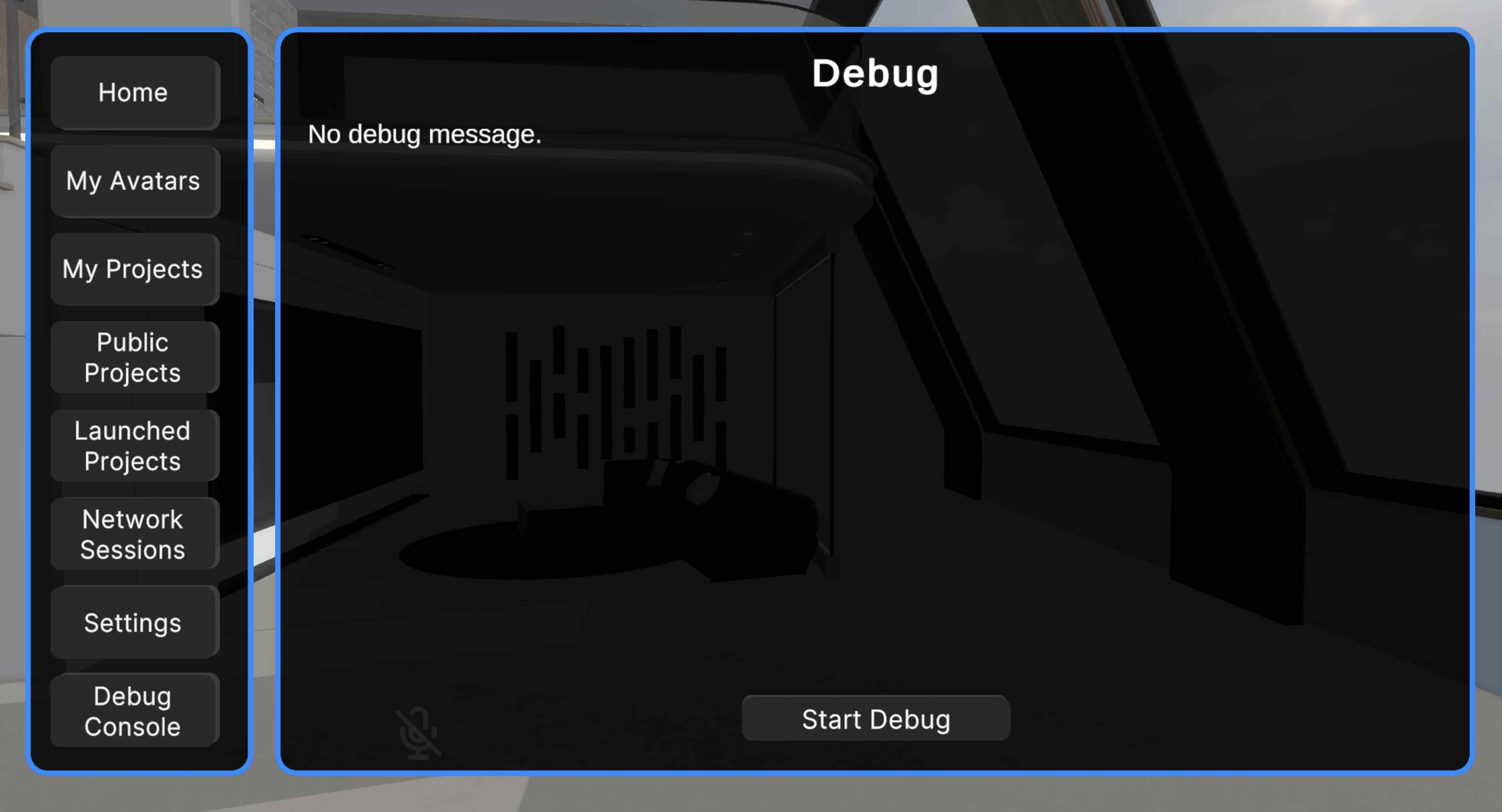
Debug panel for network-session project debugging on Adamas Platform.
The network-session debugging workflow is still in an early stage of development, and feedback is welcome as the toolset continues to evolve.